Recently my supervisor reported that an application was popping “NULL Characters” errors. Meaning, that the application she was running was trying to read a file modified by a Powershell script I wrote. I used a couple of different text editors (Notepad++, UltraEdit) to examine the files, specifically the feature that allows the use of seeing/viewing symbol characters. However, even with these tools, I didn’t see any NULL characters. I even went so far as to write NULL characters to text files using Powershell. These characters did in fact appear in the text editors!!
The problem persisted, and I was told that files not modified in Powershell were working properly. Clearly my Powershell script was causing a problem. So, I did a little bit of digging, and learned that the correct tool to use was a Hex editor. I did a bit more digging, and found a freeware called XVI32.exe. XVI32.exe is a utility created by Christian Maar, and it is super helpful! This tool showed me that in fact, I did have NULL characters! Here’s what I saw:
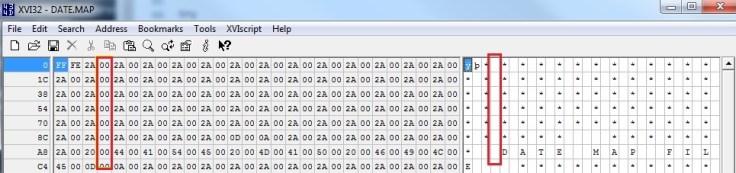

All of those “00”s are the NULL characters. I realized that at point, my problem was the character encoding. It turns out the default encoding is Unicode, which uses 2 8-bit spaces, not the single 8 bits used in ASCII. My fix ended up being simple, all I had to do was change the Out-File by specifying the -Encoding value, as seen here:

.png)
Rerunning the script gave me a different file. Here’s what XVI32.exe now showed me:

.png)
You can see a considerable difference between the first and third picture. This time, I got all asterisks (“2A”), as I expected. More importantly, my supervisor’s application worked properly.
 Sharing a few thoughts
Leave a comment